Turn form responses into a filled-in PDF — automatically
You already collect the information in a form. But then someone on your team opens a PDF template, retypes every answer into the right box, exports it, and emails it back. Multiply that by every waiver, rental agreement, membership form, or order confirmation and it becomes a real, error-prone tax on your day.
The fix is a form-to-PDF workflow: the form your respondent fills out is the thing that produces the finished PDF. No rekeying, no second tool, no waiting. Below is why the common approaches are painful — and how to set this up natively in Halloform in about ten minutes.
The 3 ways people usually auto-fill a PDF (and why each one hurts)
1. Zapier + a PDF-generation API
The classic stack: your form triggers a Zap, which calls a service like PDF.co, Documint, or an HTML-to-PDF API, which maps fields and returns a file. It works — but you're now paying for (and debugging) threeproducts, mapping fields in a place that's separate from where you built the form, and a single renamed field silently breaks the whole chain. It's a lot of moving parts for "put this answer in that box."
2. DocuSign / e-signature templates
Great when you genuinely need a legally binding signature ceremony with an audit trail. Overkill — and pricey per envelope — when you just need a completed document generated from answers (a booking confirmation, an intake summary, a gym waiver a parent fills in on their phone). You end up paying signature-grade prices for document-generation-grade needs.
3. Doing it by hand
The most common "solution" of all: read the response, open the template, type it in. Free, until you count the minutes per document and the typos that slip into a legal form. It doesn't scale past a handful a week.
The simpler way: let the form fill the PDF for you
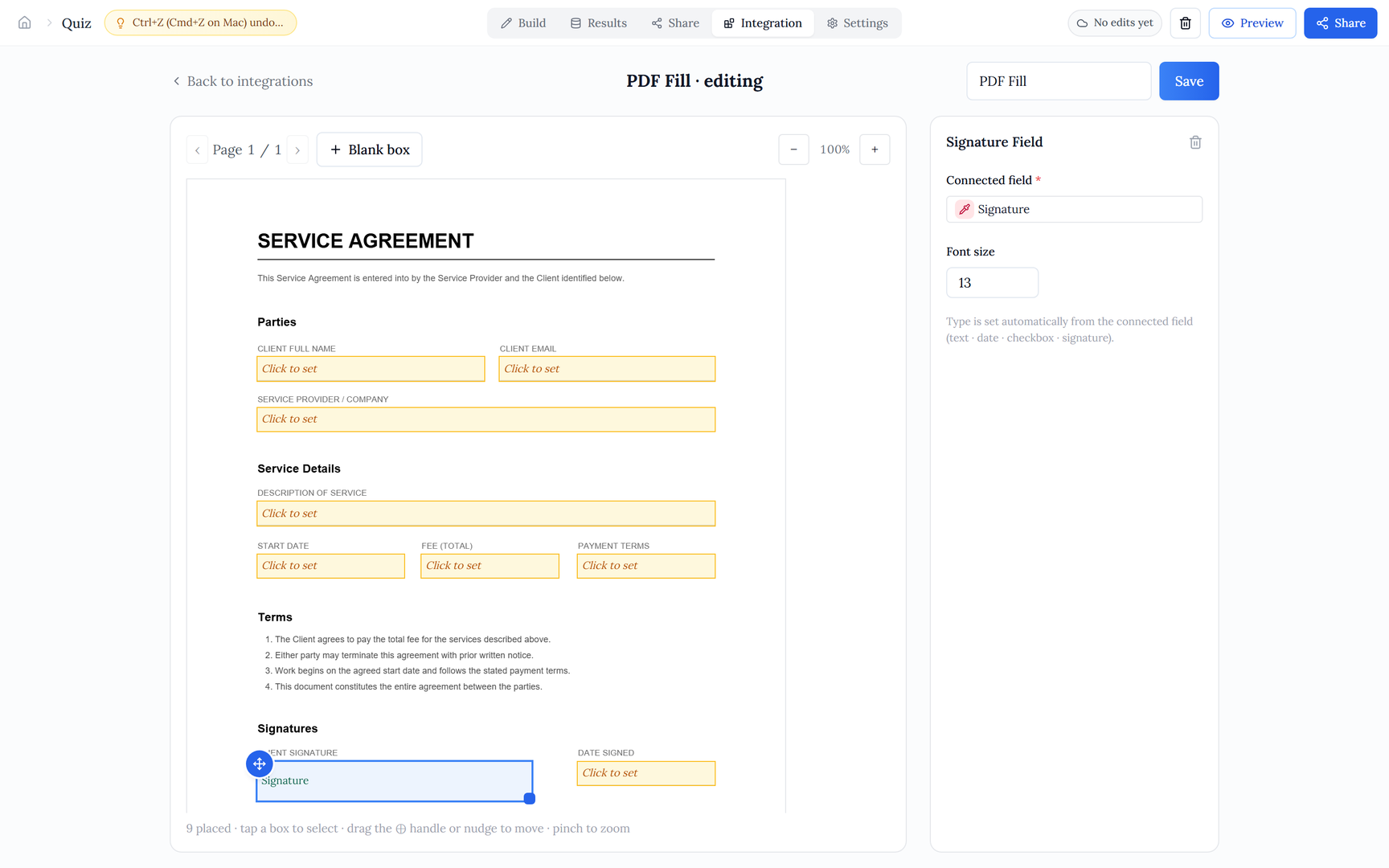
In Halloform this is a built-in integration, not a bolt-on. You bring your existing PDF (the exact contract or form you already use), place fields onto it once, and every submission generates its own filled copy on demand. Three steps:
Because the field mapping lives on the form itself, there's no separate integration to keep in sync — rename a field and the mapping follows it. And generation happens on demand, so you're never storing stale copies of documents that change.
A real example: an event waiver, start to finish
Say you run weekend climbing sessions and need a liability waiver signed before anyone starts. Here's the whole flow:
- Build a short form: full name, date of birth, emergency contact, a signature field, and a date.
- Add the PDF Fill integration and upload your existing waiver PDF.
- Drag a box onto the signature line and connect it to the signature field; do the same for name, DOB, and date.
- Share the form link (or embed it, or put it on your own domain). A participant fills it in on their phone at the door.
- The moment they submit, their signed waiver PDF is generated — they can download it immediately, and it's waiting for you in your results.
No laptop at the front desk, no scanning, no "we'll email it to you later." The same pattern works for rental agreements, membership forms, permission slips, purchase orders, or a tidy PDF summary of any intake.
How the respondent gets their copy
After submitting, the respondent sees a download button on the thank-you page, backed by a secure signed link — so they get their completed document without needing an account or a login. You get the same file from your submissions view. One form, two copies, zero manual steps.
When this beats DocuSign — and when it doesn't
For the large middle ground — "I collect answers and I need a finished PDF out the other end" — a native form-to-PDF flow is faster to set up, cheaper to run, and far less to maintain than a Zapier chain or a per-envelope signing plan.
Try it with your own PDF
Build a form, upload the document you already use, and watch a filled copy generate on your first submission. Free to start.
Build your form-to-PDF flow free